> ## Documentation Index
> Fetch the complete documentation index at: https://innateinc-theo-docs-skills-authoring-api.mintlify.site/llms.txt
> Use this file to discover all available pages before exploring further.
# The Innate Agent
**The Innate agent** is the loop that makes your robot act on its own: it looks through the camera, decides what to do, and runs a skill. It runs **on the robot**, inside Innate OS.
Naming: "the Innate agent" is the loop. The "agents" you write (see [Agents](/software/agents)) are Python files — a prompt, some skills, some inputs — that tell the loop who to be.
## Look, think, act
The agent works in **turns**. One turn at a time, never two at once:
Take the latest camera frame, plus everything that happened since the last turn — what you said, what a skill reported, what a sensor sent in.
Send that to a vision-language model, together with your agent's prompt and its skills described as callable tools.
Do what came back: start a skill, drive somewhere it can see, say something out loud, or nothing at all.
Speech streams out sentence by sentence as the model writes it, so the robot starts talking before it has finished thinking.
**Interrupting works.** If you talk while the robot is mid-thought and it hasn't started speaking yet, that turn is thrown away and re-run — this time seeing everything it saw *plus* what you just said. Nothing is lost: a turn only counts as done once it commits.
## Watching it think
The web app's **Brain** page shows the loop as it runs — the exact frames each turn saw, what it decided, and how long it took.
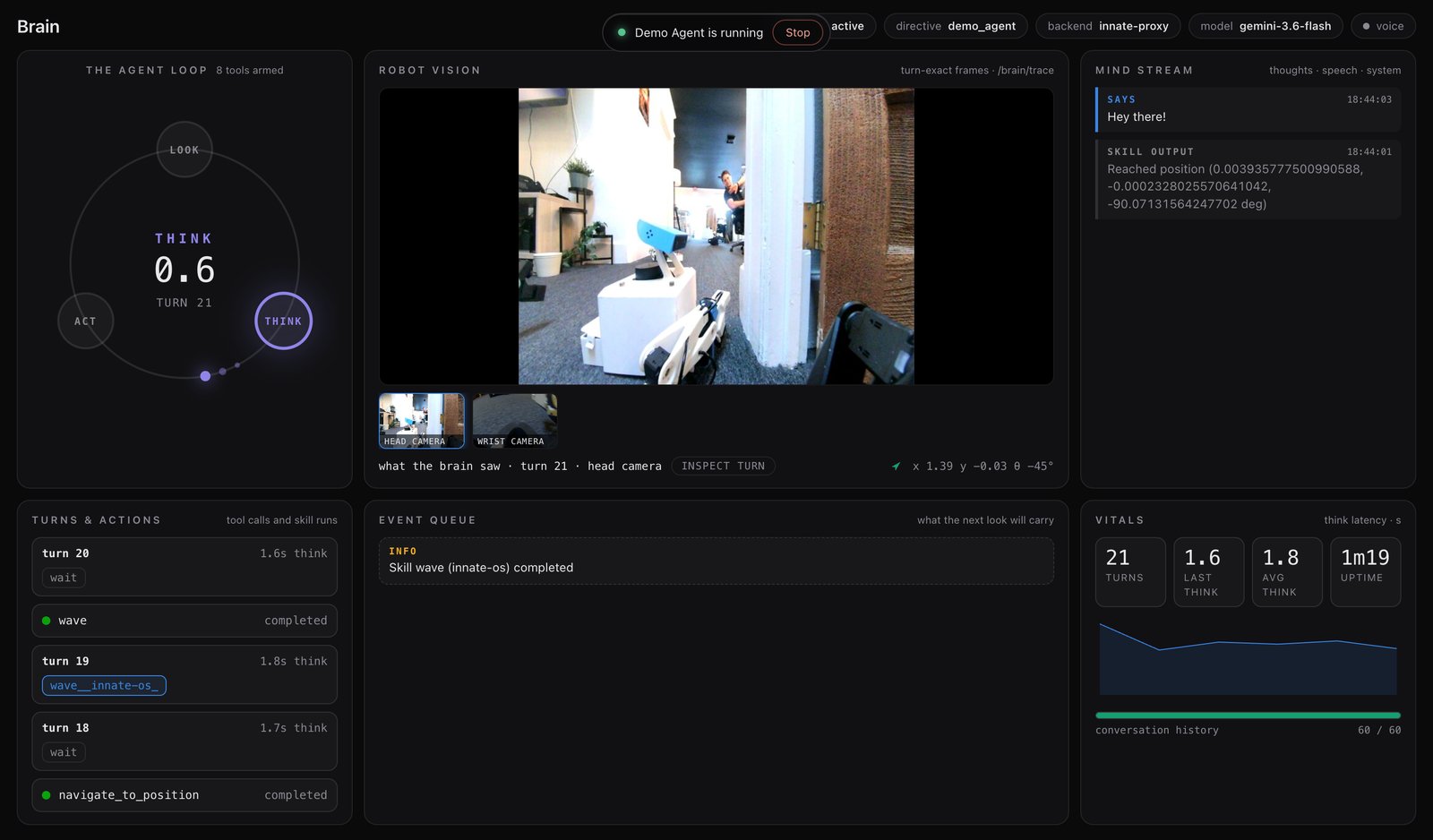 `INSPECT TURN` opens the full request behind any turn. It's the fastest way to find out why the robot did something.
## Skills are the agent's tools
Every skill in the active agent becomes a function the model can call. Your `execute()` signature becomes the parameters; your `guidelines()` (or class docstring) becomes the description. That's the whole contract — see [Code-Defined Skills](/software/skills/code-defined-skills).
Three tools are always there, whatever your agent lists:
| Tool | What it does |
| --------------------- | ---------------------------------------------------------------------------------------------------------------------------------------------------------------------------------------- |
| `wait` | Do nothing until the next update. Keeps idle turns quiet. |
| `go_to_point_in_view` | Point at a spot on the floor in the current camera frame; the robot drives to just short of it and turns to face it. Available when `navigate_to_position` is one of the agent's skills. |
| `stop_current_skill` | Abort the running skill. Only offered while one is running. |
**While a skill runs, stopping it is the only action offered.** The robot can still talk — it just can't start a second skill on top of the first.
## Which model runs it
The agent runs on Gemini (`gemini-3.6-flash` by default — the model is a `brain_client_node` setting in [`config/settings.yaml`](/software/configuration)). There are three ways to connect it, set in the `.env` file on the robot:
| Option | What you need |
| ------------------------- | ------------------------------------------------------------------------------------------------------------------------------------------------------------------ |
| **Innate's hosted brain** | Nothing — your robot ships with an `INNATE_SERVICE_KEY` and reaches Gemini through Innate's proxy. |
| **Your own key** | Set `GEMINI_API_KEY` in `~/innate-os/.env`. The robot calls Google directly. |
| **No brain** | Leave both unset. The robot still drives, runs skills you trigger yourself, and streams video — it just won't decide anything on its own, and says so in the chat. |
The hosted brain is free for all users of Innate robots for 300 cumulative hours — and probably more if you ask us on [Discord](https://discord.com/invite/KtkyT97kc7).
Your service key lives in `~/innate-os/.env` on the robot; `cat ~/innate-os/.env` shows it. If you've lost it, ask us on Discord or [by email](mailto:axel@innate.bot).
## It remembers where things are
As the robot drives around, it keeps a **spatial memory**: the views worth keeping, tied to the map and to when they were seen. Ask "where did you last see my keys?" and it searches those views, answers, and can drive back to the spot.
Your skills can search it too — see [Spatial Memory](/software/skills/code-defined-skills/spatial-memory).
`INSPECT TURN` opens the full request behind any turn. It's the fastest way to find out why the robot did something.
## Skills are the agent's tools
Every skill in the active agent becomes a function the model can call. Your `execute()` signature becomes the parameters; your `guidelines()` (or class docstring) becomes the description. That's the whole contract — see [Code-Defined Skills](/software/skills/code-defined-skills).
Three tools are always there, whatever your agent lists:
| Tool | What it does |
| --------------------- | ---------------------------------------------------------------------------------------------------------------------------------------------------------------------------------------- |
| `wait` | Do nothing until the next update. Keeps idle turns quiet. |
| `go_to_point_in_view` | Point at a spot on the floor in the current camera frame; the robot drives to just short of it and turns to face it. Available when `navigate_to_position` is one of the agent's skills. |
| `stop_current_skill` | Abort the running skill. Only offered while one is running. |
**While a skill runs, stopping it is the only action offered.** The robot can still talk — it just can't start a second skill on top of the first.
## Which model runs it
The agent runs on Gemini (`gemini-3.6-flash` by default — the model is a `brain_client_node` setting in [`config/settings.yaml`](/software/configuration)). There are three ways to connect it, set in the `.env` file on the robot:
| Option | What you need |
| ------------------------- | ------------------------------------------------------------------------------------------------------------------------------------------------------------------ |
| **Innate's hosted brain** | Nothing — your robot ships with an `INNATE_SERVICE_KEY` and reaches Gemini through Innate's proxy. |
| **Your own key** | Set `GEMINI_API_KEY` in `~/innate-os/.env`. The robot calls Google directly. |
| **No brain** | Leave both unset. The robot still drives, runs skills you trigger yourself, and streams video — it just won't decide anything on its own, and says so in the chat. |
The hosted brain is free for all users of Innate robots for 300 cumulative hours — and probably more if you ask us on [Discord](https://discord.com/invite/KtkyT97kc7).
Your service key lives in `~/innate-os/.env` on the robot; `cat ~/innate-os/.env` shows it. If you've lost it, ask us on Discord or [by email](mailto:axel@innate.bot).
## It remembers where things are
As the robot drives around, it keeps a **spatial memory**: the views worth keeping, tied to the map and to when they were seen. Ask "where did you last see my keys?" and it searches those views, answers, and can drive back to the spot.
Your skills can search it too — see [Spatial Memory](/software/skills/code-defined-skills/spatial-memory).